Just had an issue where I could not mount my USB drive at boot time I was getting an error along the lines of UUID=blah not found...I previously had performed the standard "sudo blkid" and received the following output:
[corte@ashbox ~]$ sudo blkid
Password:
/dev/sda1: LABEL="Boot" UUID="3a31d197-0436-4b87-9f06-b03080a3772f" TYPE="ext2"
/dev/sda2: UUID="ea73d633-0f71-43a3-9101-6461f19b1222" TYPE="swap"
/dev/sda3: LABEL="Root" UUID="63b1459a-3ee6-4d7a-9afa-9ad40db800bd" TYPE="ext4"
/dev/sda4: LABEL="Home" UUID="00e59ee8-019b-4ad2-9171-e8501a1022c3" TYPE="ext4"
/dev/sdb1: LABEL="Elements" UUID="7da36762-56c3-471d-bfa1-5b4895bfa0d7" TYPE="xfs"
Noting the UUID of my external USB drive (Elements), I added the following line into my fstab file:
UUID=7da36762-56c3-471d-bfa1-5b4895bfa0d7 /media/Elements auto defaults 0 0
Everything went dandy with a "mount -a" yet at the next reboot, I received an error stating that the device with the UUID 7da..could not be found. A bit of research lead me to the solution...
Including "usb" before "filesystems" in the hooks section of your /etc/mkinitcpio.conf file:
HOOKS="base udev autodetect pata scsi sata usb filesystems v86d"
Regenerate your mkinitcpio file with:
sudo mkinitcpio -g kernel26.img
Then be sure to make a backup of your old /boot/kernel26.img
sudo mv /boot/kernel26.img /boot/kernel26.img.bak
Finally, copy your new kernel26.img to /boot.
cp kernel26.img /boot/kernel26.img
Now reboot and your external drive should be mounted automatically with no issues.
Sunday, July 18, 2010


Friday, June 18, 2010
Completely Unrelated...
Completely unrelated to the song, but quite a dope ass song:
1773 - Broken Star
Broken star,
I see you from afar,
With your upper torso pressed up against the passenger side of a car,
Attention directed towards some cat,
Pullin' over in the Cadalliac,
Cause he noticed your back was fat,
But the fact is your attempts are to supplement what you lack,
Trapped into believing what some stranger had promised you,
Mainpulating, stating, that this ain't nothing that you gotta do,
Conning you before you know he turns to you and speak,
Don't worry it's just gonna be,
Herpes you and me,
Now disease and the sea symoblize your promiscuity,
I knew a similar star that was already broken,
I'm speakin' on something that you already knowing,
Traveling all roads,
That long have been chosen by a man who control,
Her mind and her soul,
Always treated her cold, and always needed to know, where she would be,
And what time she was there 'til,
If he thought she was lyin',
He would give her a black bruise,
As a youngin',
She was always a tad lewd,
The story of her life,
Struggle to survive but barely staying alive,
Wanting to end the strife,
[Chorus]
Broken star,
Can't you see that you are falling oh so fast?
This won't last
She was a broken star and couldn't travel far,
Broken star,
Can't you see that you are falling oh so fast?
This won't last,
She was a broken star and couldn't travel far,
This broken star was constantly filled with pain,
No one was able to see, the tears in her name,
She was a slave, to the fear, that had claimed her life for so long what else can go wrong,
She could hardly hold on,
She said his grip was so strong,
And she couldn't break free,
And she get loose,
His hands, tied around, her neck like a noose,
She was tired of it, and wanted something new but didn't know where to start,
Alone in her heart,
Wanting to get far was the state of this star,
Mentally damaged with emotions to manage,
Physically famished to the point your lists have anything that's handed,
Branded by beasts who won't deny,
What they demanded and that seed that's implanted suddenly forced to vanish,
Created by a stranger and we didn't plant it,
It's the thought that led you to your decision,
Cause you figured it'd be better of dead than with an infected one to livin',
Given' the circumstances,
You justify your actions,
By saying you were given a corner and forced by back in,
But really it was what you chose that made this happen,
[Chorus]
To get ahead you feel you're doing what you have to do,
But simultaneously spreading what was passed to you,
Back when you were half developing, initiated,
Enabled to count all the times that you been degraded,
Now you feel you kid your soul and you wished you saved it,
Jaded from being so misguided and the world divided,
Thought this was the plan for life but now you wanna revise it,
It be wise you changed before you're old and scarred,
And grow so far from being who you know you are,
Cause you use to shine bright now you're a broken star,
She finally gathered the strength to leave this man,
No longer, will her face come in contact with his hand,
She's starting to realize that she seems to understand,
What it is she has done,
And what she's gotta do,
Now she sees the sun and the sky so blue,
And for the first time in her life, she feels real peace,
Left another man in her life, initials J.C.,
He heard her cry out when she yelled "save me!"
He came to her rescue and said I will mend you,
No longer broken star, my love now protects you,
[Chorus]
You're a star, you're a star,
So let your light shine,
Cause the nigga's see the light and the light so bright,
Let your light shine,
Cause the nigga's see the light and the light so bright.
1773 - Broken Star
Broken star,
I see you from afar,
With your upper torso pressed up against the passenger side of a car,
Attention directed towards some cat,
Pullin' over in the Cadalliac,
Cause he noticed your back was fat,
But the fact is your attempts are to supplement what you lack,
Trapped into believing what some stranger had promised you,
Mainpulating, stating, that this ain't nothing that you gotta do,
Conning you before you know he turns to you and speak,
Don't worry it's just gonna be,
Herpes you and me,
Now disease and the sea symoblize your promiscuity,
I knew a similar star that was already broken,
I'm speakin' on something that you already knowing,
Traveling all roads,
That long have been chosen by a man who control,
Her mind and her soul,
Always treated her cold, and always needed to know, where she would be,
And what time she was there 'til,
If he thought she was lyin',
He would give her a black bruise,
As a youngin',
She was always a tad lewd,
The story of her life,
Struggle to survive but barely staying alive,
Wanting to end the strife,
[Chorus]
Broken star,
Can't you see that you are falling oh so fast?
This won't last
She was a broken star and couldn't travel far,
Broken star,
Can't you see that you are falling oh so fast?
This won't last,
She was a broken star and couldn't travel far,
This broken star was constantly filled with pain,
No one was able to see, the tears in her name,
She was a slave, to the fear, that had claimed her life for so long what else can go wrong,
She could hardly hold on,
She said his grip was so strong,
And she couldn't break free,
And she get loose,
His hands, tied around, her neck like a noose,
She was tired of it, and wanted something new but didn't know where to start,
Alone in her heart,
Wanting to get far was the state of this star,
Mentally damaged with emotions to manage,
Physically famished to the point your lists have anything that's handed,
Branded by beasts who won't deny,
What they demanded and that seed that's implanted suddenly forced to vanish,
Created by a stranger and we didn't plant it,
It's the thought that led you to your decision,
Cause you figured it'd be better of dead than with an infected one to livin',
Given' the circumstances,
You justify your actions,
By saying you were given a corner and forced by back in,
But really it was what you chose that made this happen,
[Chorus]
To get ahead you feel you're doing what you have to do,
But simultaneously spreading what was passed to you,
Back when you were half developing, initiated,
Enabled to count all the times that you been degraded,
Now you feel you kid your soul and you wished you saved it,
Jaded from being so misguided and the world divided,
Thought this was the plan for life but now you wanna revise it,
It be wise you changed before you're old and scarred,
And grow so far from being who you know you are,
Cause you use to shine bright now you're a broken star,
She finally gathered the strength to leave this man,
No longer, will her face come in contact with his hand,
She's starting to realize that she seems to understand,
What it is she has done,
And what she's gotta do,
Now she sees the sun and the sky so blue,
And for the first time in her life, she feels real peace,
Left another man in her life, initials J.C.,
He heard her cry out when she yelled "save me!"
He came to her rescue and said I will mend you,
No longer broken star, my love now protects you,
[Chorus]
You're a star, you're a star,
So let your light shine,
Cause the nigga's see the light and the light so bright,
Let your light shine,
Cause the nigga's see the light and the light so bright.
Sunday, April 11, 2010
Searching Removable Drives Linux
Had some trouble with something I'd had earlier trouble with in the past. When using the locate command (even after running updatedb), I was unable to search my removable USB drives.
The solution was to modify the /etc/updatedb.conf file, and remove /media from the prune path:
PRUNE_BIND_MOUNTS="yes"
# PRUNENAMES=".git .bzr .hg .svn"
PRUNEPATHS="/tmp /var/spool /media"
PRUNEFS="NFS nfs nfs4 rpc_pipefs afs binfmt_misc proc smbfs autofs iso9660 ncpfs coda devpts ftpfs devfs mfs shfs sysfs cifs lustre_lite tmpfs usbfs udf"
Guess this was more a mental note to myself :).
The solution was to modify the /etc/updatedb.conf file, and remove /media from the prune path:
PRUNE_BIND_MOUNTS="yes"
# PRUNENAMES=".git .bzr .hg .svn"
PRUNEPATHS="/tmp /var/spool /media"
PRUNEFS="NFS nfs nfs4 rpc_pipefs afs binfmt_misc proc smbfs autofs iso9660 ncpfs coda devpts ftpfs devfs mfs shfs sysfs cifs lustre_lite tmpfs usbfs udf"
Guess this was more a mental note to myself :).
Tuesday, February 16, 2010
Hiding a Window
So I recently set up a VirtualBox VM on my Windows 7 machine so I could access my XFS hard disk through a network share.
Being there's no way to hide a VirualBox VM by default (even by running in headless mode), I went ahead & wrote a quick C# program to hide running windows.
First of all, I created a .bat file to run my VM headless...the contents are as follows:
cd "C:\Program Files\Sun\VirtualBox"
VBoxHeadless.exe -s Ubuntu
Simple enough?
Here's my error-prone, crappy window hiding app:
MD5: B53BF803244C53C92E9447597BF6AA9F
http://www.megaupload.com/?d=XTTQMSG1
If it crashes your system, doesn't work, etc.......too bad! :)
Being there's no way to hide a VirualBox VM by default (even by running in headless mode), I went ahead & wrote a quick C# program to hide running windows.
First of all, I created a .bat file to run my VM headless...the contents are as follows:
cd "C:\Program Files\Sun\VirtualBox"
VBoxHeadless.exe -s Ubuntu
Simple enough?
Here's my error-prone, crappy window hiding app:
MD5: B53BF803244C53C92E9447597BF6AA9F
http://www.megaupload.com/?d=XTTQMSG1
If it crashes your system, doesn't work, etc.......too bad! :)
Tuesday, December 1, 2009
HTTP Traffic Blocked (Windows XP)
Yesterday, I got some work fixing a PC that was loaded with Trojans. After a repair installation of XP Pro w/SP2, I was brought to the activation window which could not hit the internet.
Thinking the problem was a driver issue, I quickly pulled the Windows key + U trick to pull up an explorer window. Finding the drivers were intact, I proceeded to both ping 4.2.2.2 & google.com, as well as nslookup google.com. Both were successful.
I opened an IE window, checked the proxy settings, reset all the settings, etc...still could not browse--was getting the error "Internet Explorer can not open the search page." & a page cannot be displayed error.
Thinking the trojan was still impacting IE, I installed Firefox from a flash drive, and ended up with the same result.
I next attempted to telnet to port 80 & 8080 on a number of web sites. All HTTP traffic was blocked.
After a few more hours of struggling & research, I realized the culprit:
Norton Internet Security Version 2006 (Symantec).
A run of the Norton Removal Tool (http://service1.symantec.com/Support/tsgeninfo.nsf/docid/2005033108162039) & reboot, and the issue was resolved.
Thinking the problem was a driver issue, I quickly pulled the Windows key + U trick to pull up an explorer window. Finding the drivers were intact, I proceeded to both ping 4.2.2.2 & google.com, as well as nslookup google.com. Both were successful.
I opened an IE window, checked the proxy settings, reset all the settings, etc...still could not browse--was getting the error "Internet Explorer can not open the search page." & a page cannot be displayed error.
Thinking the trojan was still impacting IE, I installed Firefox from a flash drive, and ended up with the same result.
I next attempted to telnet to port 80 & 8080 on a number of web sites. All HTTP traffic was blocked.
After a few more hours of struggling & research, I realized the culprit:
Norton Internet Security Version 2006 (Symantec).
A run of the Norton Removal Tool (http://service1.symantec.com/Support/tsgeninfo.nsf/docid/2005033108162039) & reboot, and the issue was resolved.
Thursday, November 26, 2009
Terminal Services Event ID 6037
I recently struggled with this one for work, after I made a change to IIS on our terminal server (Server 2008 Standard). I could not launch TS RemoteApps, as credentials were being consistently rejected, though correct. The only error I could find in the event log was along these lines:
Log Name: System
Source: LsaSrv
Date: 10/27/2008 10:46:40 PM
Event ID: 6037
Task Category: None
Level: Warning
Keywords: Classic
User: N/A
Computer: Gateway
Description:
The program lsass.exe, with the assigned process ID 572, could not authenticate locally by using the target name TERMSERV/ts.xxxx.com. The target name used is not valid. A target name should refer to one of the local computer names, for example, the DNS host name.
This error may also contain address "HTTP/ts.xxxx.com"
Thanks to Chad A. Gross on the http://www.vistax64.com forums, I was pointed at a blog with a solution: http://blogs.technet.com/sbs/archive/2009/05/07/event-2436-for-sharepoint-services-3-search.aspx.
Though the blog states a solution for a different problem, it worked just as well for me:
Click Start, click Run, type regedit, and then click OK.
In Registry Editor, locate and then click the following registry key:
HKEY_LOCAL_MACHINE\SYSTEM\CurrentControlSet\Control\Lsa\MSV1_0
Right-click MSV1_0, point to New, and then click Multi-String Value.
Type BackConnectionHostNames, and then press ENTER.
Right-click BackConnectionHostNames, and then click Modify.
In the Value data box, type the URL mentioned in the above warning event, and then click OK.
Quit Registry Editor, and then restart the IIS service.
For good measure, I restarted the server and bam, the error was gone.
Log Name: System
Source: LsaSrv
Date: 10/27/2008 10:46:40 PM
Event ID: 6037
Task Category: None
Level: Warning
Keywords: Classic
User: N/A
Computer: Gateway
Description:
The program lsass.exe, with the assigned process ID 572, could not authenticate locally by using the target name TERMSERV/ts.xxxx.com. The target name used is not valid. A target name should refer to one of the local computer names, for example, the DNS host name.
This error may also contain address "HTTP/ts.xxxx.com"
Thanks to Chad A. Gross on the http://www.vistax64.com forums, I was pointed at a blog with a solution: http://blogs.technet.com/sbs/archive/2009/05/07/event-2436-for-sharepoint-services-3-search.aspx.
Though the blog states a solution for a different problem, it worked just as well for me:
Click Start, click Run, type regedit, and then click OK.
In Registry Editor, locate and then click the following registry key:
HKEY_LOCAL_MACHINE\SYSTEM\CurrentControlSet\Control\Lsa\MSV1_0
Right-click MSV1_0, point to New, and then click Multi-String Value.
Type BackConnectionHostNames, and then press ENTER.
Right-click BackConnectionHostNames, and then click Modify.
In the Value data box, type the URL mentioned in the above warning event, and then click OK.
Quit Registry Editor, and then restart the IIS service.
For good measure, I restarted the server and bam, the error was gone.
Monday, October 19, 2009
Installing .TTF Fonts in Slackware 12.2
I was recently working on a project for my boss when I found I needed to install some new fonts for GIMP.
I had downloaded some free TTF's from http://www.1001freefonts.com/ & needed to install them.
Restarting X was a pain, so I found the following steps worked with only restarting GIMP:
1.) Move your fonts into the ~/.fonts folder. Create it if it doesn't exist.
2.) Run command makefontdir
3.) Run command makefontscale
4.) Run command fc-cache
5.) Finally, command xset fp rehash
6.) Restart whatever application you're working with, be it GIMP, OOo, or whatever.
Your font should now be listed!
I had downloaded some free TTF's from http://www.1001freefonts.com/ & needed to install them.
Restarting X was a pain, so I found the following steps worked with only restarting GIMP:
1.) Move your fonts into the ~/.fonts folder. Create it if it doesn't exist.
2.) Run command makefontdir
3.) Run command makefontscale
4.) Run command fc-cache
5.) Finally, command xset fp rehash
6.) Restart whatever application you're working with, be it GIMP, OOo, or whatever.
Your font should now be listed!
Thursday, October 1, 2009
Installing (Free) G729 Codec on Trixbox CE
The G.729 codec is a low-bandwidth codec, excellent for use in VoIP.
In this case, a client which my company manages wanted to minimize bandwidth usage from VoIP phones traveling through a VPN. Both the G729 & G723 codec are freely available from here, though you can alawys purchase a copy from Digium.
First download the G729 codec appropriate for your processor & system type. A great way to find this information is to run a cat /proc/cpuinfo and a uname -m command. Search down through the list (ensure you download G729, not G723!) for your appropriate binary. In my case, we were running on a P4 with no ss3, so I stuck with the standard codec_g729ast14-gcc4-glibc-pentium4.so binary.
Now, I'm not sure if this is necessary, but I moved the /usr/lib/asterisk/modules/format_g729.so file out of the /usr/lib/asterisk/modules folder, over to /home/root. I did this to ensure we were starting fresh.
Next, copy the downloaded codec over to that same /usr/asterisk/modules folder. Connect into asterisk console with the command asterisk -r, and load the new codec with module load codec_g729-ast14-gcc4-glibc-pentium4.so, or whatever your codec was.
You would think the phone system would be ready for G729 use, but in my case, I needed to restart asterisk with the command restart gracefully. Ensure everyone is out of the office, as this will drop all live calls!
When asterisk comes back up, log back into asterisk and run the command show translation which should give you some output such as the following:

As long as there’s a # (in this case, 6’s) and not a – under the g729 codec, we know it’s working properly.
The next step would be to head into the web interface, under PBX->PBX Settings->Extensions, choose the extension you wish to enable the codec for, ensure disallow is set to “all” and allow is set to “g729”.

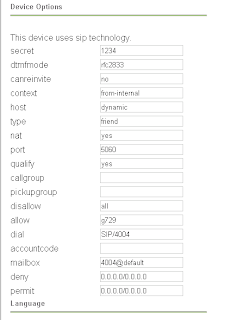
Once the extension is set up to allow g729, you can test whether it’s working properly by having a test call connected and running the command sip show channels:
trixbox1*CLI> sip show channels
Peer User/ANR Call ID Seq (Tx/Rx) Format Hold Last Message
10.100.253.91 4004 2e1225e1-27 00101/00002 0x100 (g729) No Rx: ACK
:).
In this case, a client which my company manages wanted to minimize bandwidth usage from VoIP phones traveling through a VPN. Both the G729 & G723 codec are freely available from here, though you can alawys purchase a copy from Digium.
First download the G729 codec appropriate for your processor & system type. A great way to find this information is to run a cat /proc/cpuinfo and a uname -m command. Search down through the list (ensure you download G729, not G723!) for your appropriate binary. In my case, we were running on a P4 with no ss3, so I stuck with the standard codec_g729ast14-gcc4-glibc-pentium4.so binary.
Now, I'm not sure if this is necessary, but I moved the /usr/lib/asterisk/modules/format_g729.so file out of the /usr/lib/asterisk/modules folder, over to /home/root. I did this to ensure we were starting fresh.
Next, copy the downloaded codec over to that same /usr/asterisk/modules folder. Connect into asterisk console with the command asterisk -r, and load the new codec with module load codec_g729-ast14-gcc4-glibc-pentium4.so, or whatever your codec was.
You would think the phone system would be ready for G729 use, but in my case, I needed to restart asterisk with the command restart gracefully. Ensure everyone is out of the office, as this will drop all live calls!
When asterisk comes back up, log back into asterisk and run the command show translation which should give you some output such as the following:

As long as there’s a # (in this case, 6’s) and not a – under the g729 codec, we know it’s working properly.
The next step would be to head into the web interface, under PBX->PBX Settings->Extensions, choose the extension you wish to enable the codec for, ensure disallow is set to “all” and allow is set to “g729”.


Once the extension is set up to allow g729, you can test whether it’s working properly by having a test call connected and running the command sip show channels:
trixbox1*CLI> sip show channels
Peer User/ANR Call ID Seq (Tx/Rx) Format Hold Last Message
10.100.253.91 4004 2e1225e1-27 00101/00002 0x100 (g729) No Rx: ACK
:).
Monday, September 7, 2009
Sharing LAN/Internet Connection to 2nd NIC
I bought a PS3 several months ago, and wanted to try streaming movies to the PS3 using something like Mediatomb or PS3 Media Server (my personal favorite).
My first attempted involved transcoding & wireless..the combination resulted in endless lag & choppiness, that essentially made the movie unplayable. To resolve the issue, I decided to install a secondary NIC into my PC, to share the connection from the first NIC. This way, I could not only stream movies from my PC directly to the PS3 via crossover cable, I could also access the internet as well.
To begin, ensure that your NIC has been properly installed in your kernel. A quick lspci should do the trick:
00:00.0 Host bridge: VIA Technologies, Inc. VT8366/A/7 [Apollo KT266/A/333]
00:01.0 PCI bridge: VIA Technologies, Inc. VT8366/A/7 [Apollo KT266/A/333 AGP]
00:09.0 Multimedia audio controller: C-Media Electronics Inc CM8738 (rev 10)
00:0a.0 Ethernet controller: ADMtek NC100 Network Everywhere Fast Ethernet 10/100 (rev 11)
00:10.0 USB Controller: VIA Technologies, Inc. VT82xxxxx UHCI USB 1.1 Controller (rev 80)
00:10.1 USB Controller: VIA Technologies, Inc. VT82xxxxx UHCI USB 1.1 Controller (rev 80)
Boom. Now let's proceed to ensuring that IPv4 forwarding is enabled. In Slackware 12.2, we can ensure this forwarding is enabled at boot time by by navigating over to /etc/rc.d/ & checking that the file rc.ip_forward has the execute permission (it's green when we type ls, if your bash is using colors). If not, we run the command su -c "chmod +x rc.ip_forward", then the command /etc/rc.d/rc.ip_forward start -- the final result should be as following: Activating IPv4 packet forwarding.
Next, I set a static IP on the secondary NIC as 192.168.2.2. My other NIC (and router) are on the 192.168.1.1 subnet. Here's a quick view of my topology:
|Router|
192.168.1.1
|
192.168.1.33 (eth1)
|PC|
192.168.2.1 (eth0)
|PS3|
192.168.2.1
As you can see the secondary NIC & PS3 are on a completely different subnet. This is to avoid having to add a route on my router to route packets to the PS3.
My NIC configuration on the PC's secondary NIC is set as following, in my /etc/rc.d/rc.inet1.conf:
# Config information for eth0: (connected to the PS3)
IPADDR[0]="192.168.2.1"
NETMASK[0]="255.255.255.0"
USE_DHCP[0]=""
DHCP_HOSTNAME[0]=""
# Config information for eth1: (connected to the LAN)
IPADDR[1]="192.168.1.133"
NETMASK[1]="255.255.255.0"
USE_DHCP[1]=""
DHCP_HOSTNAME[1]=""
Once you save the configuration, restart your internet services with the command /etc/rc.d/rc.inet1 restart -- your NIC's should now hold the proper IP addresses.
Now our next step will be to create a new start-up script in /etc/rc.d to properly forward traffic between the two NIC's. My file is named /etc/rc.d/rc.ps3 (appropriate, huh ;]), and contains the following:
#!/bin/sh
echo "Starting PS3 services..."
/usr/sbin/iptables -F
/usr/sbin/iptables -t nat -F
/usr/sbin/iptables -t mangle -F
/usr/sbin/iptables -t nat -A POSTROUTING -o eth1 -j MASQUERADE
/usr/sbin/iptables -A FORWARD -i eth0 -j ACCEPT
echo "PS3 crossover forwarding enabled."
In this example, my external NIC (facing the LAN/internet) is eth1, while the NIC connected to the PS3 via crossover is eth0.
Save the file, and set the execute bit with chmod +x rc.ps3 ....
Have fun streaming & surfing!
My first attempted involved transcoding & wireless..the combination resulted in endless lag & choppiness, that essentially made the movie unplayable. To resolve the issue, I decided to install a secondary NIC into my PC, to share the connection from the first NIC. This way, I could not only stream movies from my PC directly to the PS3 via crossover cable, I could also access the internet as well.
To begin, ensure that your NIC has been properly installed in your kernel. A quick lspci should do the trick:
00:00.0 Host bridge: VIA Technologies, Inc. VT8366/A/7 [Apollo KT266/A/333]
00:01.0 PCI bridge: VIA Technologies, Inc. VT8366/A/7 [Apollo KT266/A/333 AGP]
00:09.0 Multimedia audio controller: C-Media Electronics Inc CM8738 (rev 10)
00:0a.0 Ethernet controller: ADMtek NC100 Network Everywhere Fast Ethernet 10/100 (rev 11)
00:10.0 USB Controller: VIA Technologies, Inc. VT82xxxxx UHCI USB 1.1 Controller (rev 80)
00:10.1 USB Controller: VIA Technologies, Inc. VT82xxxxx UHCI USB 1.1 Controller (rev 80)
Boom. Now let's proceed to ensuring that IPv4 forwarding is enabled. In Slackware 12.2, we can ensure this forwarding is enabled at boot time by by navigating over to /etc/rc.d/ & checking that the file rc.ip_forward has the execute permission (it's green when we type ls, if your bash is using colors). If not, we run the command su -c "chmod +x rc.ip_forward", then the command /etc/rc.d/rc.ip_forward start -- the final result should be as following: Activating IPv4 packet forwarding.
Next, I set a static IP on the secondary NIC as 192.168.2.2. My other NIC (and router) are on the 192.168.1.1 subnet. Here's a quick view of my topology:
|Router|
192.168.1.1
|
192.168.1.33 (eth1)
|PC|
192.168.2.1 (eth0)
|PS3|
192.168.2.1
As you can see the secondary NIC & PS3 are on a completely different subnet. This is to avoid having to add a route on my router to route packets to the PS3.
My NIC configuration on the PC's secondary NIC is set as following, in my /etc/rc.d/rc.inet1.conf:
# Config information for eth0: (connected to the PS3)
IPADDR[0]="192.168.2.1"
NETMASK[0]="255.255.255.0"
USE_DHCP[0]=""
DHCP_HOSTNAME[0]=""
# Config information for eth1: (connected to the LAN)
IPADDR[1]="192.168.1.133"
NETMASK[1]="255.255.255.0"
USE_DHCP[1]=""
DHCP_HOSTNAME[1]=""
Once you save the configuration, restart your internet services with the command /etc/rc.d/rc.inet1 restart -- your NIC's should now hold the proper IP addresses.
Now our next step will be to create a new start-up script in /etc/rc.d to properly forward traffic between the two NIC's. My file is named /etc/rc.d/rc.ps3 (appropriate, huh ;]), and contains the following:
#!/bin/sh
echo "Starting PS3 services..."
/usr/sbin/iptables -F
/usr/sbin/iptables -t nat -F
/usr/sbin/iptables -t mangle -F
/usr/sbin/iptables -t nat -A POSTROUTING -o eth1 -j MASQUERADE
/usr/sbin/iptables -A FORWARD -i eth0 -j ACCEPT
echo "PS3 crossover forwarding enabled."
In this example, my external NIC (facing the LAN/internet) is eth1, while the NIC connected to the PS3 via crossover is eth0.
Save the file, and set the execute bit with chmod +x rc.ps3 ....
Have fun streaming & surfing!
Tuesday, September 1, 2009
/proc/misc: No entry for device-mapper found Is device-mapper driver missing from kernel?
This is a bit of an irritating error, with a simple solution:
/proc/misc: No entry for device-mapper found
Is device-mapper driver missing from kernel?
Failure to communicate with kernel device-mapper driver.
Added Linux *
First of all, we need to make sure that our kernel configuration has Device Drivers->Multiple devices driver support (RAID and LVM) compiled in, with Device Mapper Support as a module.
Once device mapper support is compiled in as a module, if we still receive the error, we can run:
sudo modprobe dm_mod
sudo /sbin/lilo
The errors should now be gone:
Added Linux *
/proc/misc: No entry for device-mapper found
Is device-mapper driver missing from kernel?
Failure to communicate with kernel device-mapper driver.
Added Linux *
First of all, we need to make sure that our kernel configuration has Device Drivers->Multiple devices driver support (RAID and LVM) compiled in, with Device Mapper Support as a module.
Once device mapper support is compiled in as a module, if we still receive the error, we can run:
sudo modprobe dm_mod
sudo /sbin/lilo
The errors should now be gone:
Added Linux *
Subscribe to:
Posts (Atom)